
- "Training" vs grounding: clearing up the confusion
- The data sources that teach your chatbot
- Preparing your data so the bot can use it
- Connecting your website and keeping it in sync
- Handling documents and structured content
- Guardrails: keeping the bot honest
- Testing and iterating
- Security, privacy and where your data lives
- A simple path to a well-trained chatbot
- How Runtime Solutions can help
- Frequently Asked Questions
Training an AI chatbot is mostly about giving it the right knowledge, not rebuilding the underlying model. A modern AI chatbot is grounded in your own content — your website pages, PDFs, FAQs, product catalogues and internal knowledge bases — and it answers from that material rather than from generic internet knowledge. Done well, this is what makes the difference between a bot that gives vague, off-brand replies and one that answers like a staff member who has read everything your business has ever published. This guide explains what “training” really means for today’s chatbots, which data sources to use, how to prepare them, and how to keep answers accurate, current and safe.
“Training” vs grounding: clearing up the confusion
The word “training” causes a lot of confusion, so it is worth being precise. When people picture training an AI chatbot, they often imagine teaching a model from scratch or retraining it on their data — an expensive, specialised process. For the vast majority of business chatbots, that is not what happens and not what you need.
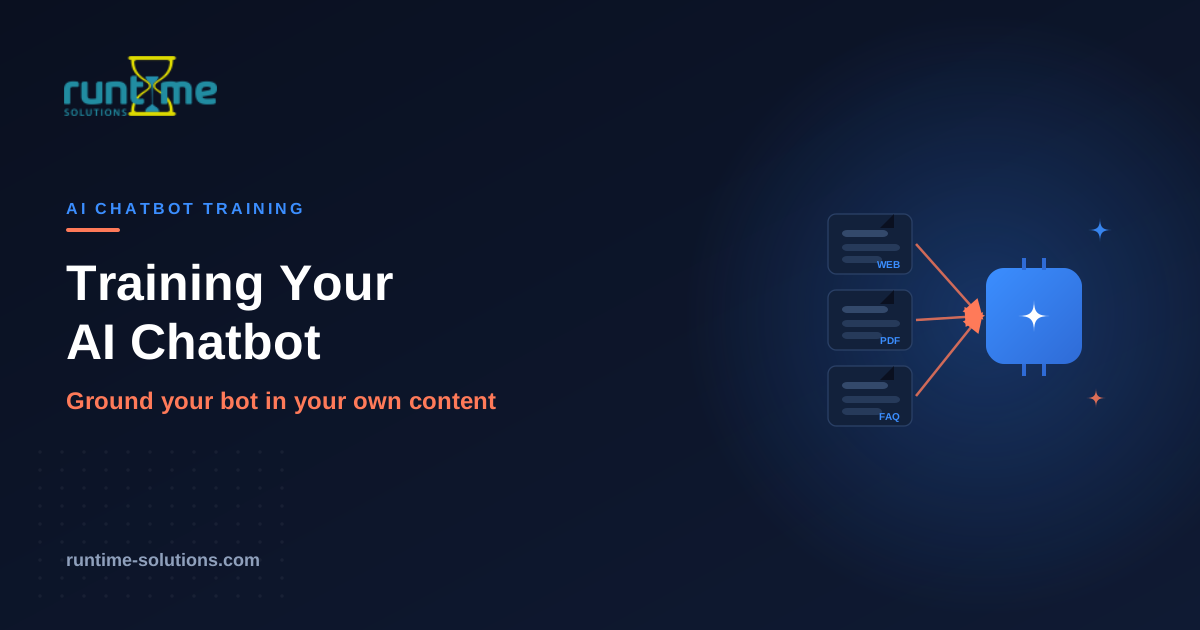
Instead, most practical AI chatbots use an approach commonly called retrieval-augmented generation, or RAG. The language model stays as it is. What you add is a searchable store of your own knowledge. When a customer asks a question, the system retrieves the most relevant passages from your content and gives them to the model as context, and the model composes an answer grounded in that material. In plain terms: the model supplies the language ability, and your content supplies the facts.
This distinction matters because it changes how you think about the whole project. You are not running a machine-learning experiment. You are curating a knowledge base and connecting it to a capable language model. The quality of your chatbot therefore depends far less on exotic AI tuning and far more on something very ordinary: how good, how complete and how well-organised your own content is. That is good news, because it is something any business can control.
The data sources that teach your chatbot
A chatbot is only as knowledgeable as the sources it can draw on. The richest deployments pull from several kinds of content, each covering a different slice of what customers ask.
Your website content is usually the foundation. Product and service pages, your About and contact information, pricing pages, policy pages and blog articles all describe what you do, who you serve and how you operate. For most businesses this alone answers a large share of common questions.
Help documentation and FAQs are the next layer, and often the most valuable for support. These are already written as questions and answers or step-by-step instructions, which is exactly the shape a chatbot uses well. If you have a help centre, a knowledge base or even a well-maintained FAQ page, it is high-quality training material with very little preparation needed.
PDFs and documents let you extend the bot beyond what is published on the web. Product manuals, spec sheets, brochures, policy documents, onboarding guides and white papers often contain detailed answers that never made it onto a web page. Feeding these in means the chatbot can answer specific, technical questions that a website alone cannot.
Product catalogues and structured data matter enormously for commerce and anything with a large inventory. Catalogues, price lists and specification tables let the chatbot answer questions about particular items — availability, variants, compatibility, pricing — rather than only speaking in generalities.
Internal knowledge bases — the wikis, process documents and accumulated know-how a team keeps for itself — can power internal-facing chatbots that help staff find policies and procedures quickly. For customer-facing bots, the relevant parts of this material can be selectively included, with anything confidential deliberately left out.
Finally, past support conversations and tickets are an underused goldmine. They show the real questions customers ask, in their real words, along with the answers that worked. Mined carefully, they reveal both what the bot needs to know and the phrasing customers actually use.
Preparing your data so the bot can use it
Raw content rarely performs at its best until it has been cleaned up. A little preparation produces a noticeable jump in answer quality, and skipping it is the most common reason a chatbot underwhelms.
Start by cleaning and de-duplicating. Outdated pages, contradictory versions of a policy, and abandoned draft documents all confuse the system, because when two sources disagree the bot may surface either one. Before you load content, make sure it reflects current reality and that you are not feeding the bot three slightly different answers to the same question.
Next, structure matters more than people expect. Content broken into clear sections with descriptive headings, short focused paragraphs and defined terms is far easier for a retrieval system to search than a wall of unbroken text. The same qualities that make a page readable for humans make it retrievable for a chatbot. If your best knowledge is buried in dense, unstructured documents, reorganising it pays off directly.
Behind the scenes, content is usually chunked — split into passages of a sensible size — so the system can retrieve the precise part that answers a question rather than an entire document. You do not normally manage this by hand, but it is worth knowing why structure helps: well-organised content chunks cleanly along its natural sections, while a sprawling document chunks awkwardly and retrieves poorly.
Adding metadata — tags for product, category, audience, date or document type — gives the system extra signals about what each piece of content is and when it applies. This helps the bot prefer the right source, for example the current pricing page over last year’s, or the enterprise guide over the starter one.
Connecting your website and keeping it in sync
For website content, the practical question is how the chatbot stays aligned with pages that change. Good deployments can crawl your site to ingest its content and then re-sync as that content changes, so the bot’s knowledge tracks your live site rather than drifting out of date the moment you edit a page.
The important discipline here is freshness. A chatbot grounded in a snapshot from six months ago will confidently give six-month-old answers. Prices change, policies change, products launch and retire. Whatever your setup, you need a plan for keeping the bot’s knowledge current — whether that is automatic re-syncing, a scheduled refresh, or a habit of updating the bot whenever you update the underlying content. Treat the knowledge base as something you maintain, not something you build once.
Handling documents and structured content
Documents and structured data each bring their own considerations. PDFs and office documents need their text extracted cleanly; a scanned document that is really just images of text needs optical character recognition before the content inside it becomes usable. Tables, specs and catalogues carry meaning in their structure, so preserving the relationship between a product and its attributes — rather than flattening everything into loose text — is what lets the bot answer precise questions like which variant fits which use.
The general rule is that the more faithfully the original structure is preserved, the better the bot can reason over it. A price list that keeps its rows and columns intact supports accurate answers about specific items; the same list dumped into a paragraph does not.
Guardrails: keeping the bot honest
A chatbot that confidently invents answers is worse than no chatbot at all, so guardrails are not optional. The goal is a bot that answers from your content when it can and admits the limits when it cannot.
The foundation is grounding itself: because the bot answers from your supplied material rather than from open-ended generation, it is far less prone to making things up. But grounding should be reinforced with scope. Define what the chatbot is there to do and what it should not attempt, so it does not wander into topics it has no business answering. When a question falls outside its knowledge, the right behaviour is to say so and offer a path forward — pointing to a human, capturing the query, or suggesting where to look — rather than guessing.
This “I don’t know, but here’s what I can do” behaviour is a feature, not a weakness. Customers trust a bot that is honest about its limits far more than one that bluffs and is occasionally wrong in ways they only discover later. Building in a clean escalation to a human for anything beyond the bot’s scope is part of the same discipline.
Testing and iterating
A chatbot is never finished at launch; it is tuned through use. Before going live, test it against the real questions customers ask — ideally drawn from your actual support history — and check not just whether the answers are correct but whether they are complete, clear and on-brand. Deliberately probe the edges: ambiguous questions, things outside its scope, and topics where your content is thin, to see how gracefully it handles what it does not know.
After launch, the transcripts become your improvement engine. Reviewing real conversations shows where answers are weak, where content is missing, and where customers phrase things in ways the bot struggles with. Each of those findings points to a specific fix — usually a content improvement rather than a technical one. A chatbot reviewed and refined monthly keeps getting better; one deployed and ignored repeats the same weak answers indefinitely.
Security, privacy and where your data lives
Training a chatbot means handing it your content, and sometimes that content is sensitive. Where that data is processed and stored becomes a real decision, especially under India’s Digital Personal Data Protection framework and similar regimes elsewhere.
The key control is deployment choice. A chatbot can be run cloud-hosted for convenience, or as a private, self-hosted deployment so that sensitive data stays within your own control — which is the central requirement for DPDP-aligned handling. For businesses dealing with personal data, regulated information or confidential internal material, the ability to keep that data inside your own environment is often the deciding factor. Alongside deployment, it is worth scoping deliberately what the bot is allowed to access and store, so confidential material is included only where it genuinely needs to be and excluded everywhere else.
A simple path to a well-trained chatbot
Pulling it together, the route to a chatbot that answers well is straightforward in outline. Gather your best content across website, documents, FAQs and catalogues. Clean it so it is current and consistent, and structure it so it is easy to search. Connect your website so the bot stays in sync as pages change. Set guardrails so the bot answers within its scope and escalates honestly when it cannot. Test against real questions before launch, and review transcripts after it to keep improving. And choose a deployment model that fits your privacy and compliance needs. None of this requires machine-learning expertise — it requires treating your own knowledge as the asset it is.
How Runtime Solutions can help
Runtime Solutions builds AI chatbots that are trained on your own content and stay grounded in it. The chatbot learns from your website and can be extended with your documents, FAQs and product catalogues, so it answers from your real information rather than generic responses — and it can be re-synced as your content changes, so its knowledge tracks your live site rather than going stale.
It is built with the practical realities of training in mind: it understands natural language and context rather than matching keywords, it handles routine questions automatically and escalates to a human with full context when a query falls outside its scope, and it can be deployed cloud-hosted or as a private, self-hosted model so sensitive data stays within your control for DPDP-aligned handling. Conversation analytics show you what people are actually asking, which is the fastest way to find the content gaps worth filling.
If you want a chatbot trained properly on your own knowledge — not a generic widget — Runtime Solutions can scope the data sources, preparation and deployment to your business and build it to answer accurately from day one.
Frequently Asked Questions
Do I need to “train” a language model from scratch for my chatbot?
No. Most business chatbots use retrieval-augmented generation (RAG): the language model stays as it is, and you supply a searchable store of your own content that the bot draws on to answer. You are curating a knowledge base and connecting it to a capable model, not running a machine-learning project.
What content can I use to train my chatbot?
Your website pages, help documentation and FAQs, PDFs and documents such as manuals and brochures, product catalogues and structured data, relevant internal knowledge, and even past support conversations. The broader and cleaner the source material, the more questions the bot can answer well.
How do I stop the chatbot from giving wrong or made-up answers?
Ground it in your own content, define its scope so it does not attempt things it should not, and have it admit when it does not know and escalate to a human rather than guessing. Grounding plus clear scope plus honest escalation is what keeps a bot reliable.
How does the chatbot stay up to date when my website changes?
A good deployment can re-sync with your content as it changes, so the bot’s knowledge tracks your live site. Freshness is a discipline to plan for — through automatic syncing or a scheduled refresh — because a bot grounded in old content will confidently give old answers.
Is my data safe when I train a chatbot on it?
It depends on where the data is processed and stored. Running the chatbot as a private, self-hosted deployment keeps sensitive data within your own control, which is the key requirement for DPDP-aligned handling. Scoping what the bot can access and store is part of the same discipline.